HoloLens an Elemental overview
What is Holo Lens?
It is a mixed reality device.
Through it you can see real world objects and virtual objects at a same time.
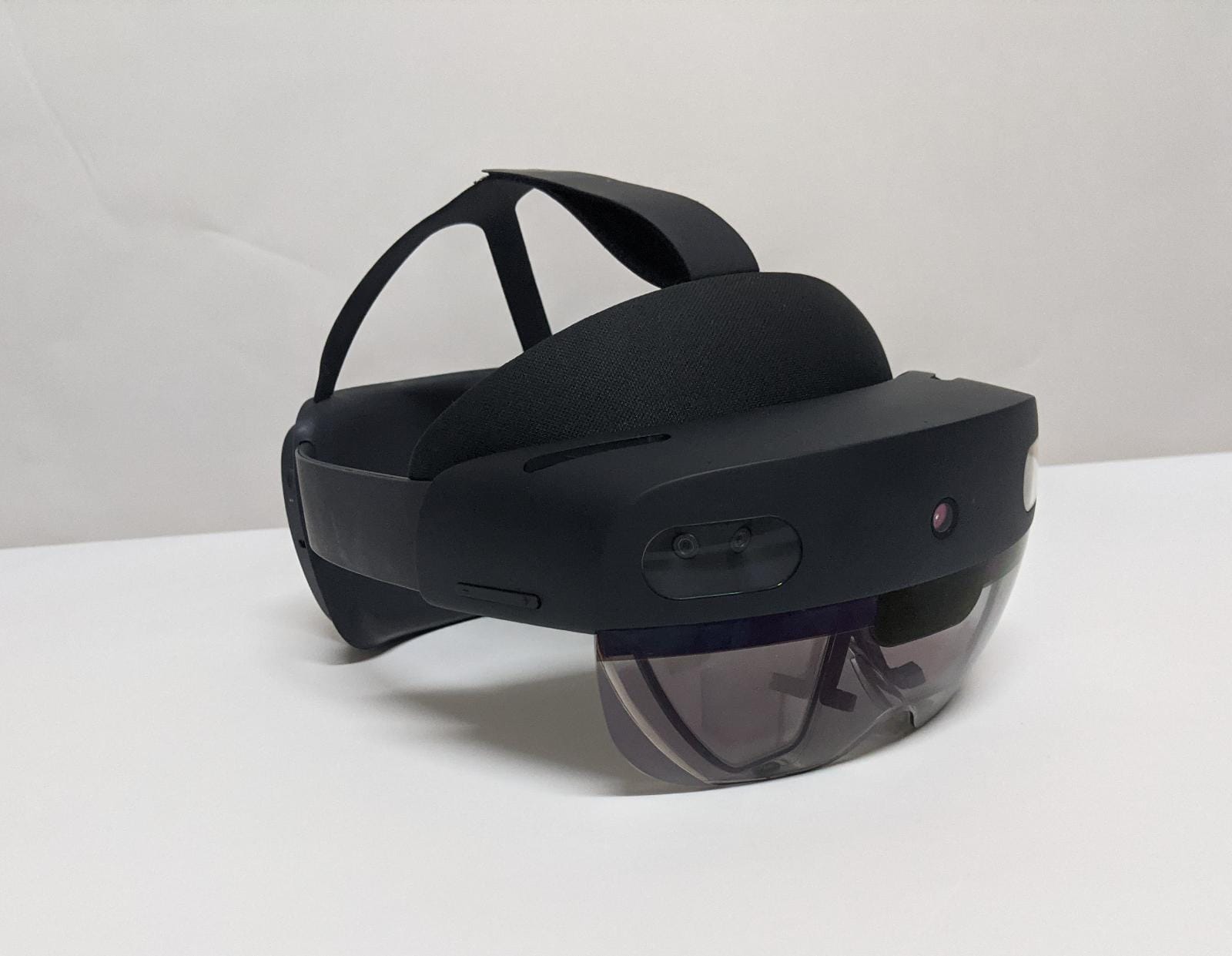
Holo Lens Hardware:
- The top part is Headband which keeps the device secured on the head.
- It has a computer in the back which projects the images in front of your eyes.
- On the left side, there are Brightness buttons and volume buttons are on right side.
- The front part is where all the sensors are. It is called Visor. It has following
- 2 cameras on each sides for tracking objects in space
- A camera to take photos and videos 2 IR cameras for eye tracking
- A sensor to check depth and distance of the objects
- The middle part in this glass is display
- It also has microphone and speaker
Why this is good?
- Allows you to freely move around and use both of your hands
How to work with Holo Lens?
If you have used a Microsoft Windows computer, you know what to do. Only difference is, windows, menus and buttons will be floating in space.
The start button will be on your wrist and windows will be floating in space around you.
What to be careful?
- The main things to be careful is surroundings. Make sure you don't bump into walls or furniture
- Make sure head strap is not too tight - or you will get a headache
- Also using it for a long time may give you a headache
My hands on experience
Where can I find more information?
The Microsoft site is a great start to understand concepts and you can also buy HoloLens from there. https://docs.microsoft.com/en-us/windows/mixed-reality/